-
Applications and components
- Developer guide
- IDE support
- Deployment
- .vespaignore files
- Containers
- Components
- Searchers
- Document processors
- Request handlers
- Result renderers
- Dependency injection
- Configuring components
- Chaining
- Inspecting structured data in a Searcher
- Developing web services
- Unit testing
- System testing
- The config system
- Request-response processing
- Bundles
- Using ZooKeeper
- Http servers and filters
- Using pluggable frameworks
- Java config API
-
Querying
- The query api
- The YQL query language
- Grouping and aggregation
- Query profiles
- An intro to vector search
- Nearest neighbor search
- Approximate nearest neighbor search
- Nearest neighbor search guide
- Text matching
- Searching multivalue fields
- Geo search
- Document summaries
- Result diversity
- Federation
- Page templates
- Filter intersections
-
Ranking and inference
- Ranking introduction
- Ranking expressions and features
- Multivalue query operators
- Tensor user guide
- Tensor examples
- Phased ranking
- Using TensorFlow models
- Using ONNX models
- Using XGBoost models
- Using LightGBM models
- Wand: Accelerated OR search
- The BM25 rank feature
- The nativeRank rank feature
- Cross-encoder transformer ranking
- Searcher re-ranking
- Significance model
- Stateless model evaluation
-
Linguistics and text processing
-
Content and elasticity
-
Performance
- Performance overview
- Practical performance guide
- Serving sizing guide
- Feed sizing guide
- Node resources
-
Instance types
- Topology and resizing
- Streaming search
- Benchmarking
- Benchmarking using Vespa Cloud
- Memory visualizer
- Profiling
- Container tuning
- Rate-limiting queries
- Graceful degradation
- Caches
- HTTP performance testing
- HTTP/2
- Feature tuning
- Valgrind
-
Operations
- Quota
- Environments
- Zones
- Availability Zones
- Production deployment
- Deployment variants
- Automated deployments
- Autoscaling
-
Enclave: Bring your own cloud
- Reindexing
- Reindexing on Vespa Cloud
- Data management and backup
- Cloning applications and data
- Monitoring
- Metrics
- Telemetry export
- Notifications
- Support
- Login Help
- Single Sign-On (SSO) Setup
- Deployment patterns
- Private endpoints
- Endpoint routing
- Access logging
-
Artifact archive
- Deleting applications
-
Self-managed
- Admin procedures
- Multinode Systems
- Files, Processes, Ports, Environment
- Node Setup
- Build and install
- Monitoring
- Content node recovery
- Configuration Servers
- Live Vespa upgrade procedure
- Config Sentinel
- Config Proxy
- Docker Containers
- Docker Containers GPU setup
- CPU Support
- Service Location Broker
- Change from attribute to index procedure
- Container
- Sizing examples
- Vespa Support CLI
-
Kubernetes
- Introduction
-
Reference
-
Modules
-
Reference
-
Applications and components
-
Schemas and documents
-
Reading and writing
-
Operations
- Health checks
- Log files
- Tools
-
Self-managed
-
Security
-
Release notes
Refer to the Archive guide for general information about logs and artifacts like heap dumps.
After Vespa Cloud Enclave is set up, a storage bucket is created per Vespa Cloud zone you configured in the enclave. As the buckets are in your own cloud account, you can access the archive buckets directly using your existing cloud credentials:
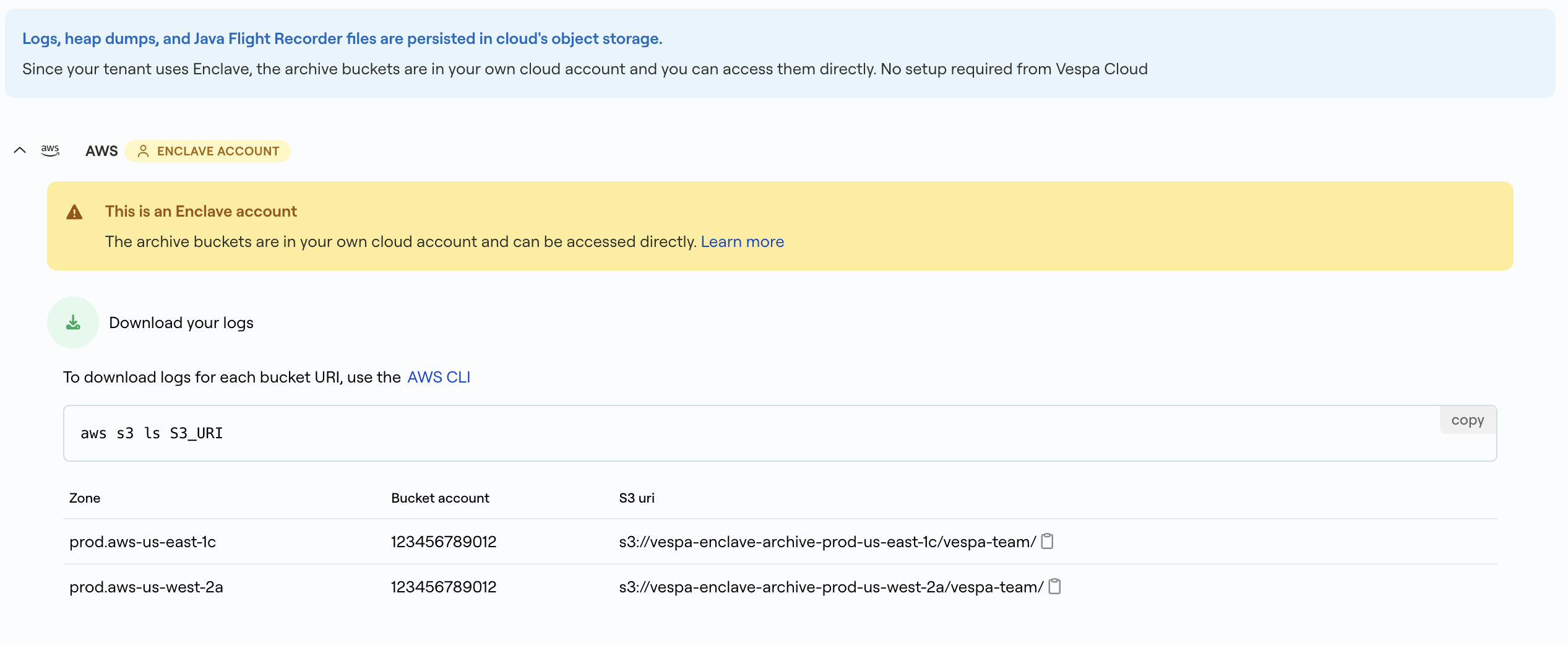
There is one storage bucket per Vespa Cloud Zone that is configured in the enclave. The name of the bucket depends on the cloud provider you are setting up the enclave in.
Files are synchronized to the archive bucket when the file is rotated by the logging system, or when a virtual machine is deprovisioned from the application. The consequence of this is that frequency of uploads will depend on the activity of the Vespa application.
Directory structure
The directory structure in the bucket for logs and heap dumps is as follows:
<tenant>/<application>/<instance>/<host>/logs/<logtype>/<logfile>

<tenant>/<application>/<instance>/<host>/service-dump/<file>
tenantis the tenant ID.applicationis the application ID that generated the log.instanceis the instance ID of the generated log, e.g.default.hostis the name prefix of the host that generated the log, e.g.e103a.logtypeis the type of log in the directory (see below).logfileis the specific file of the log.
Log types
There are three log types that are synced to this bucket.
vespa: Vespa logsaccess: Access logsconnection: Connection logs